
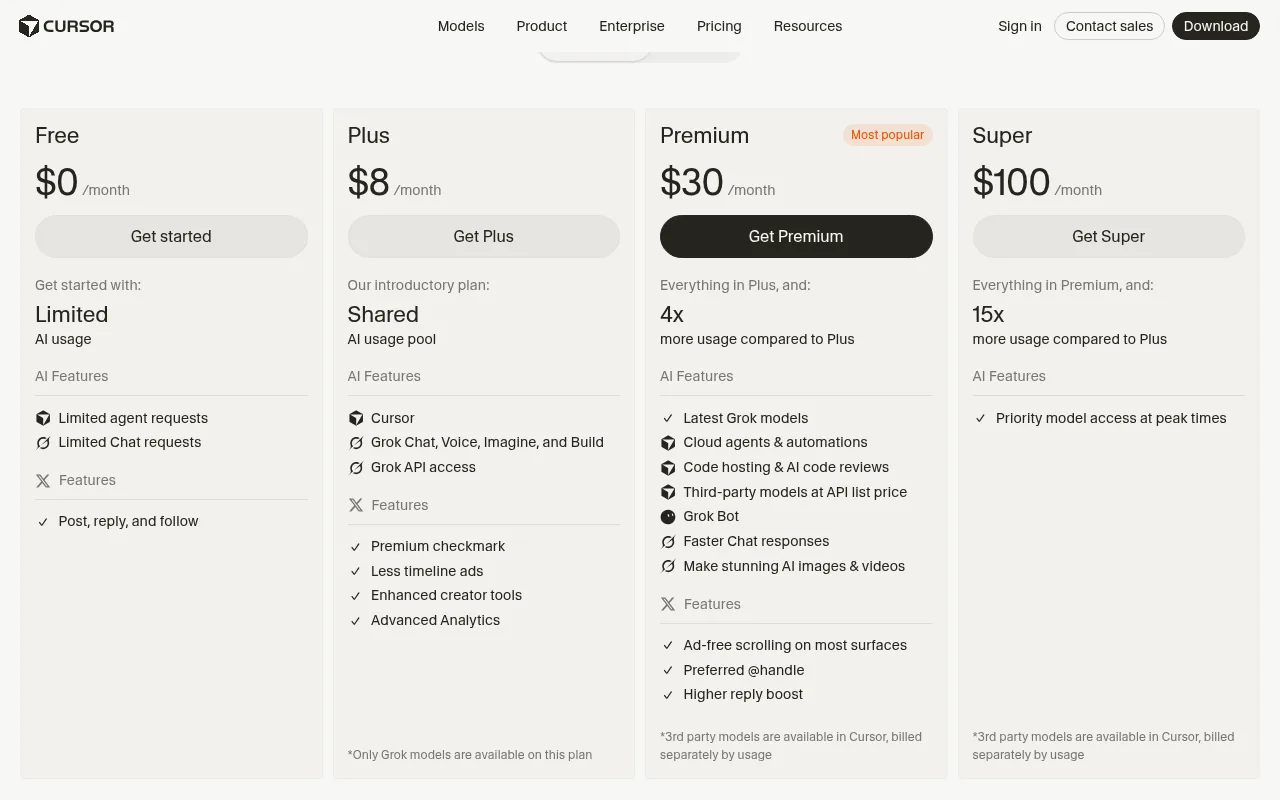
Grok Bot computer use is the ability of a Grok Bot to work on its own persistent cloud computer, with a browser, a command line and a filesystem, so it can open live web pages, take screenshots and save research files while your laptop is closed. For ad research, that makes it good at public Meta Ad Library sweeps, landing page offer captures and dated evidence packs. It is not built to get past CAPTCHAs, guess prices hidden behind a login or decide which creative deserves budget. As of 21 November 2026, Grok Bot is included on the Premium plan at $30 a month and above, per cursor.com/pricing.
This guide is based on SpaceXSI’s current Grok Bot documentation, the November changelog and the pricing page, all checked on 21 November 2026. We use Grok Bots for our own publishing and research work at Kreativemedia, but we have not run a scored benchmark for this article, so there are no invented speed tests or accuracy percentages below. What you get is what the computer can do, where it stops, and a setup that keeps a research Bot away from your ad accounts.
Grok Bot computer use at a glance
| Question | Short answer |
|---|---|
| What computer does it use? | A persistent cloud computer with a browser, command line and filesystem, assigned to your user account |
| Does it keep working when I log off? | Yes. Closing the app or your laptop does not stop cloud work |
| Do my Bots share it? | Yes. Files, browser sessions, cookies and command-line credentials are shared by every Bot on your account |
| Can I watch it? | Yes. Open the computer preview in a conversation to see clicks, typing and navigation live |
| What happens at a CAPTCHA? | The Bot hands you the computer for that step. The docs tell it not to work around checks |
| Which plan includes Grok Bot? | Premium ($30/month), Super ($100), Ultra ($200) and Teams (from $30 per user a month). Free and Plus do not include it |
What does “computer use” mean in Grok Bot?
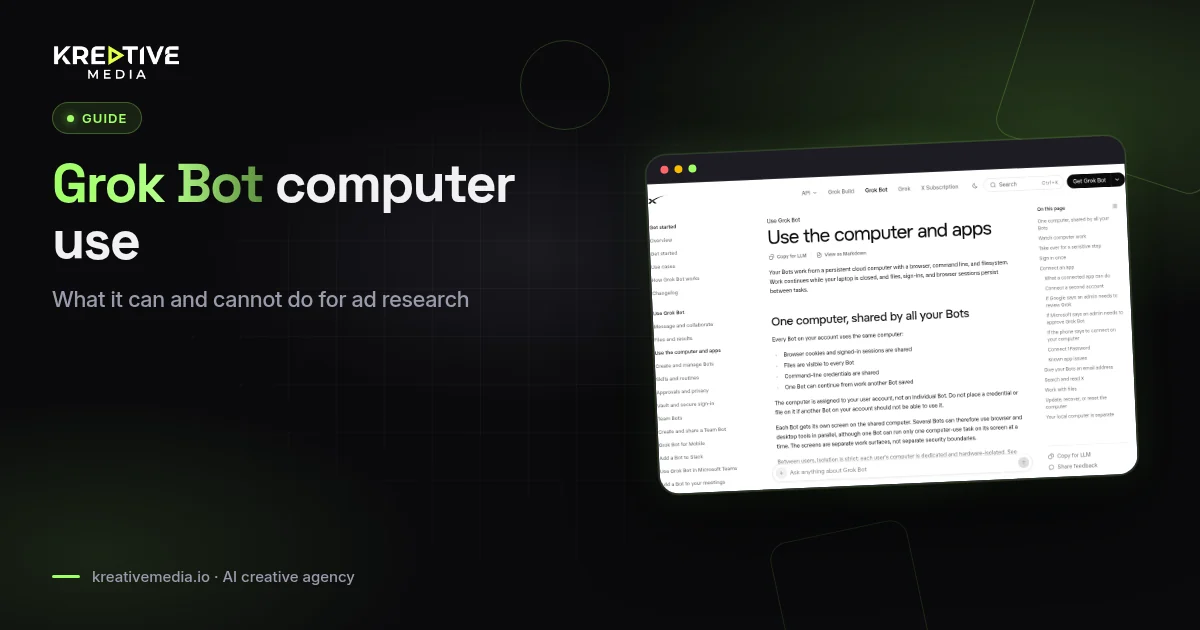
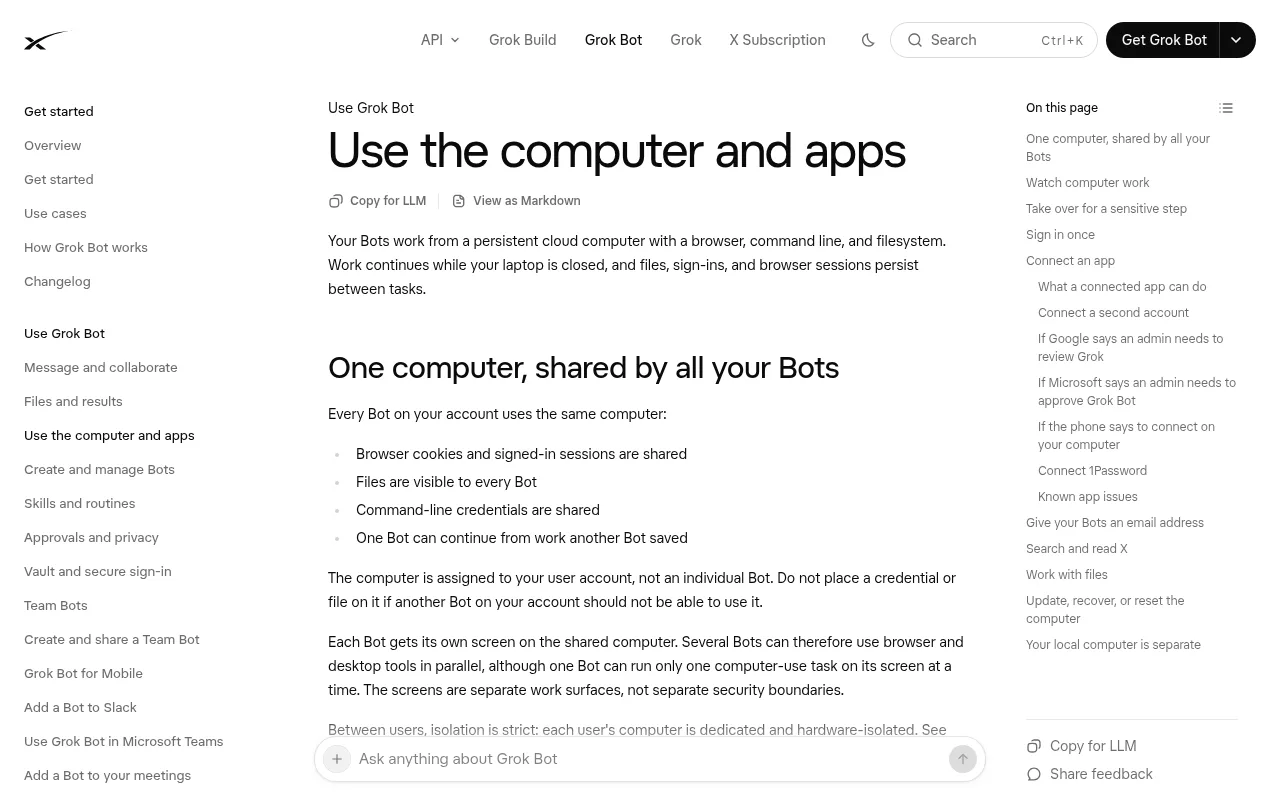
Computer use means the Bot operates a real computer instead of only reading text you paste into a chat. SpaceXSI’s Use the computer and apps page describes a persistent cloud computer with a browser, command line and filesystem, where “files, sign-ins, and browser sessions persist between tasks.” So the difference for a marketer is simple. A chat model summarises the landing page HTML you copied. A Bot with a computer opens the page itself, scrolls the creatives, saves the screenshot and writes the notes to a folder you can reopen next week.
The Verge’s launch coverage, Grok is now an AI teammate you can assign work (12 August 2026), described the Bots as sharing their own cloud-based computer and signing into apps, tools and websites to finish multi-step tasks, coming back only when the work is done or something needs approval. Grok Bot 1.0, announced on 11 November 2026, added “better browser use” and said Bots are now faster and more reliable in the browser.
If you want the bigger picture before the details, our 12 Grok Bot marketing use cases cover the jobs agencies hand to Bots first.
What Grok Bot computer use can do for ad research
Most ad research is public-page work: open a library, filter by brand or country, look at what is running and write it down. That is the part computer use handles well. Here is how we rate common research jobs for a Bot working on its own computer:
| Research task | Fit | What to tell the Bot |
|---|---|---|
| Meta Ad Library browsing | Strong | Public pages only. Stop and report if the site blocks the session |
| Landing page offer capture | Strong | Record price, shipping promise and CTA. Write price_unknown when a price needs a login |
| Screenshot evidence packs | Strong | Use one file naming scheme, such as brand-date-angle |
| Scheduled weekly sweeps | Strong, after supervised runs | Save the workflow as a skill first, then add a routine |
| Logged-in spy tools | Use with care | Store the login in Vault and give the job to one narrow research Bot |
| CAPTCHA-heavy or bot-walled sites | Weak | Expect a human takeover, or skip the site |
| Choosing winners for spend | Out of scope | Keep this with your media buyer |
The docs also say each Bot gets its own screen on the shared computer, so several Bots can browse in parallel, although one Bot runs only one computer-use task on its screen at a time. In practice that means you can split a long brand list across two research Bots instead of waiting for one to finish.
For the full workflow behind the first three rows, read how AI agents help with competitor ad creative research. If you want ready-made instructions, our 25 Grok Bot prompts for market research include an Ad Library sweep, a landing page extract and a price check with stop rules built in.
What Grok Bot computer use cannot (and should not) do
Some limits are technical. Others are rules you should set because the Bot can technically try.
- Get past human checks. SpaceXSI’s docs list single sign-on, passkeys, a CAPTCHA it couldn’t get past, approvals on another device, QR codes, bank card checks and sites that require a human as the points where the Bot hands you the computer.
- Use every website. The Grok Bot FAQ says some sites block traffic from cloud computers. You can sign in yourself on the Bot’s computer, or turn on Route traffic through this computer in Settings so sites see your own connection.
- Promise ROAS from a research sweep. A pack of competitor screenshots tells you what others are running. It does not tell you what will work for your offer.
- Check out “to see the price”. Do not let a research Bot click through a checkout on a company card. Price hidden means price_unknown.
- Message competitors or customers. Research Bots read. They do not send.
- Interpret legal terms for you. Have it quote the commercial-use sentence with a URL, then a person reads it.
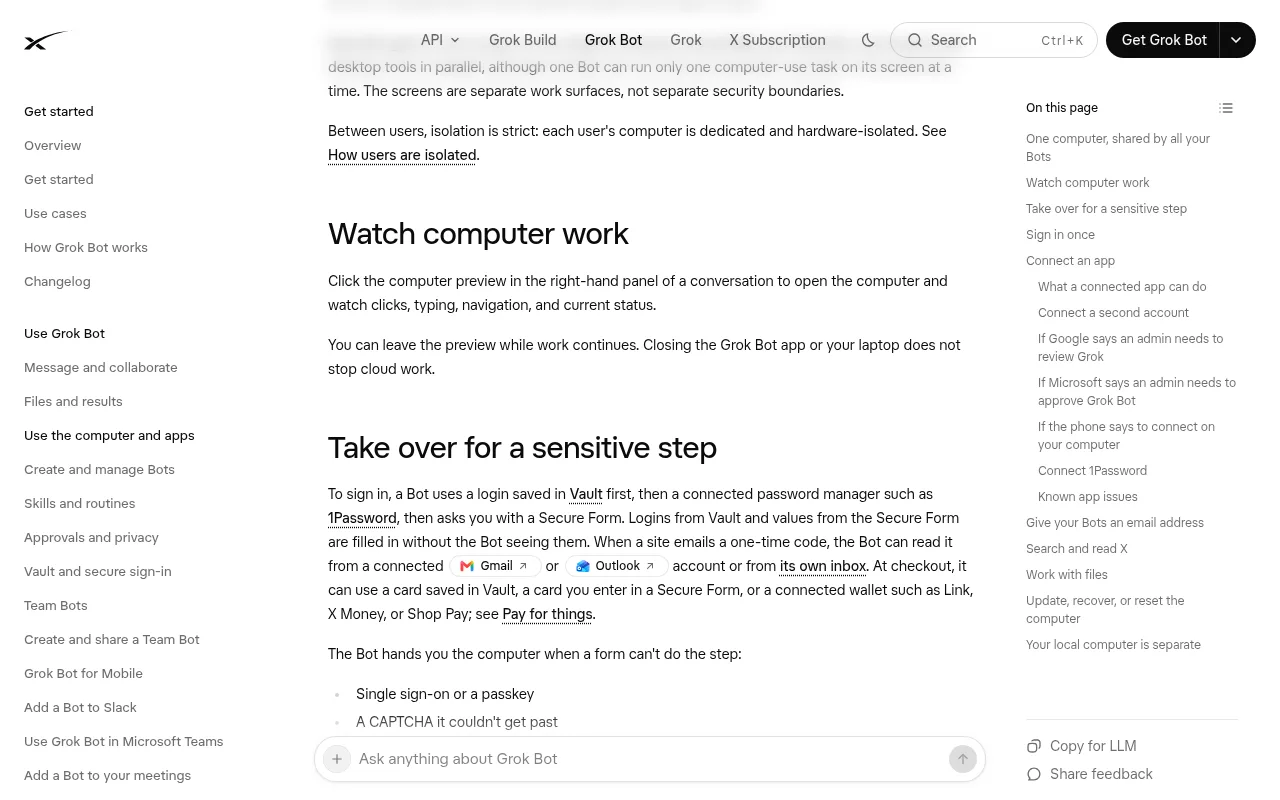
The docs are direct about the sign-in check: when a site expires a session or asks for verification again, ask the Bot “to pause and notify you rather than attempting to work around the check.” Put that sentence in every research instruction.
Why the shared computer matters for security
Every Bot on your account uses the same computer. Browser cookies and signed-in sessions are shared, files are visible to every Bot, and command-line credentials are shared too. SpaceXSI says the computer is assigned to your user account, not to an individual Bot, and warns that the separate screens are “separate work surfaces, not separate security boundaries.”
That is useful for continuity, because one Bot can pick up a research folder another Bot saved. It is also the main risk. If you sign in to your Meta Business account on the Bot’s computer for one task, your other Bots can use that session. Our rules:
- Never paste passwords or one-time codes into ordinary chat. The docs say the same. Use Vault, a connected password manager, or the Secure Form the Bot shows you, and those values are filled in without the Bot seeing them.
- Prefer an official connector over a browser login when one exists. Connected app tokens stay on Cursor’s connector backend, not on the computer.
- Keep ad accounts with spend or edit rights off the research computer.
- Do not use separate Bots as a security wall. The isolation is between users, and each user’s computer is dedicated and hardware-isolated.
Approvals add a second layer. Auto Review checks actions before they run, and SpaceXSI recommends explicit boundaries for sending messages, publishing, purchases, deleting data, changing permissions and accepting legal terms. Since the 18 November 2026 release (v1.2.3), connector pages also let you set each tool to Always allow, Auto-review, Needs approval or Blocked, which is the cleanest way to stop a research Bot from ever sending email.
How to set up a safe Grok Bot for ad research
- Create one Bot just for research and name it something obvious, like research-only.
- Give it a fixed brand list, the countries to check and an output folder pattern such as /workspace/research/2026-11-24/.
- Write the boundaries into its instructions: no ad-account edits, no purchases, no outbound messages.
- Add the stop rules: stop on a CAPTCHA, stop on an unexpected login page, stop if a site blocks the session, and report what happened.
- Set the connector tools it doesn’t need, such as Gmail send, to Blocked or Needs approval.
- Run a few supervised sessions and watch the computer preview. Log the minutes and how much of the pack you had to rewrite.
- Once a run comes back clean, save it as a skill. Add a weekly routine only after that. The skills and routines guide follows the same order: make the task reliable, save it, then automate it.
- Send the approved pack into brief writing, then into AI UGC ad production.
The Grok Bot FAQ also mentions Teach a task, where you record one browser workflow from the computer view (up to ten minutes) and the Bot turns it into a draft skill. SpaceXSI says the rollout may be gradual, so check whether you have it before you plan around it.
How much does Grok Bot cost in November 2026?
On 21 November 2026 the official pricing page listed these plans. Grok Bot is only included from Premium upward.
| Plan | Price | Grok Bot | Usage vs Plus |
|---|---|---|---|
| Free | $0/month | No | Limited |
| Plus | $8/month | No | Basic |
| Premium | $30/month | Yes | 4x |
| Super | $100/month | Yes | 15x |
| Ultra | $200/month | Yes | 50x |
| Teams | From $30 per user/month | Yes | 4x to 50x Plus, pooled |
| Enterprise | Custom | Yes, plus Grok Bot access, network and audit controls | Custom |
Usage limits matter more than the sticker price for computer-use work, because browsing and screenshots run longer than chat. TechCrunch reported on 2 November 2026 that Elon Musk throttled Grok Bot limits after some users saw their weekly usage jump to 100%, with Musk saying the cost of serving Grok Bot was “unsustainably high relative to revenue.” So start with weekly routines, not daily ones, and watch your usage for the first month.
If you are choosing between agents, our Grok Bot vs Claude comparison covers both companies’ current pricing and which jobs each one fits.
Computer use vs connectors: which one should do the job?
Use a connector when an official integration exists. The Grok Bot docs say apps “are more reliable than clicking through a website when one exists,” and when a Bot reaches a sign-in page for a site that has an app, it uses the connected app or offers its Connect card first. Use the browser for public web research and for awkward sites that will never offer an API.
Most marketing workflows need both. A Gmail connector handles inbox drafts. The browser handles the Ad Library and competitor pricing pages, because you need a visual record of the creative, and no connector gives you that.
One more practical point: computer use breaks when websites change their layout. Write skills around goals and output templates (“capture up to five active ads per brand with the hook, offer and CTA”) instead of exact click paths, and the skill survives a redesign.
What a research day with computer use looks like
Here is a sample schedule you can copy. It is a template, not a log of results:
- 09:00 The research Bot starts the Monday sweep on the fixed brand list and saves raw notes and screenshots.
- 09:35 A person skims the screenshots, deletes weak ads and flags claim risks.
- 10:00 The Bot rebuilds the pack using only the approved creatives.
- 10:20 The strategist picks three angle families.
- 10:45 Copywriting starts in your brief tool. Our Claude prompts for performance creative are built to take a cleaned pack as input.
Nowhere in that day does the Bot touch spend controls in Meta Business Manager. And if it stops at 09:12 on a CAPTCHA, a person solves it or skips that brand. A visible stop is better than a pack that looks complete and quietly is not.
How to measure whether it is working
Track three numbers anyone on the team can collect without a BI tool: cycle time from brief request to an approved research pack, edit rate (how much of the pack a person rewrites) and rejection rate (packs thrown away because the angle list was useless). Put them in a shared sheet every Friday. After four weeks you will know whether the Bot saves hours or just moves the same work into review meetings.
Don’t tie research agents to paid media ROAS in the first month. Results depend on the offer, the creative, the audience and the landing page. If leadership wants a money number, convert hours saved into the loaded cost of the people who did the work before, and call it an estimate.
Log failures in the same sheet: CAPTCHA stops, blocked sites, empty results and any price the Bot got wrong. Teams that write failures down end up with better stop rules.
When not to use computer use
Skip it when the source of truth is already an export or API you trust, when a site’s terms forbid scraping and a manual sample is enough, or when the job is pure writing with no live page to check. A spreadsheet or a writing assistant does those jobs faster.
Also keep it away from HR records, banking and customer personal data until your security review is written down. Reading public ads is a different risk class from touching customer inboxes with send rights.
Once research turns into production, the agent’s job ends. Rights checks, credit maths and disclosure stay with people, using guides like Kling vs Seedance, is Seedance safe for commercial use, Meta’s AI disclosure rules for UGC ads and how much AI video ads cost. For month-to-month changes to these tools, see our AI news for marketers roundup.
FAQs
Is Grok Bot computer use the same as a browser extension on my laptop?
No. Grok Bot works on a persistent cloud computer that SpaceXSI hosts for your account, so it keeps working when your laptop is closed. It only runs commands on your own computer if you enable that and approve it, and the default is to ask every time.
Can Grok Bot solve CAPTCHAs?
Don’t count on it. SpaceXSI’s docs say the Bot hands you the computer when it hits a CAPTCHA it couldn’t get past, and that it should hand over human-only steps rather than bypass them. Tell your research Bot to stop and report.
Is it safe to save ad account passwords on the Bot’s computer?
Only with care. Every Bot on your account shares the computer’s browser sessions, files and credentials. Use Vault or a connected password manager, prefer connectors, and keep accounts with spend rights away from research Bots.
Which plan do I need for Grok Bot computer use?
On 21 November 2026, cursor.com/pricing listed Grok Bot on Premium ($30 a month), Super ($100), Ultra ($200) and Teams (from $30 per user a month). The Free and $8 Plus plans do not include it.
Can I watch what the Bot is doing on its computer?
Yes. Click the computer preview in the right-hand panel of the conversation to see clicks, typing and navigation live. You can also take control to finish a blocked step and tell the Bot to continue.
What metrics show computer use helps research?
Cycle time to an approved pack, edit rate and rejection rate. Leave ROAS out until creatives made from the packs have run in a real media test.
How does Grok Bot compare with Claude for this work?
Grok Bot is built around a cloud computer that does live page work on a schedule. Claude is strong at structured writing inside Projects. Our Grok Bot vs Claude guide maps which jobs fit each.
Can a research Bot log in to a competitor’s tools?
Only if the access is legitimately yours. If it isn’t, stop. Stick to public surfaces like the Meta Ad Library and public landing pages.
Where should the screenshots go after a sweep?
Into a dated folder and a brief, then into production. Check rights before you reuse anything, starting with posts like is Seedance safe for commercial use.