
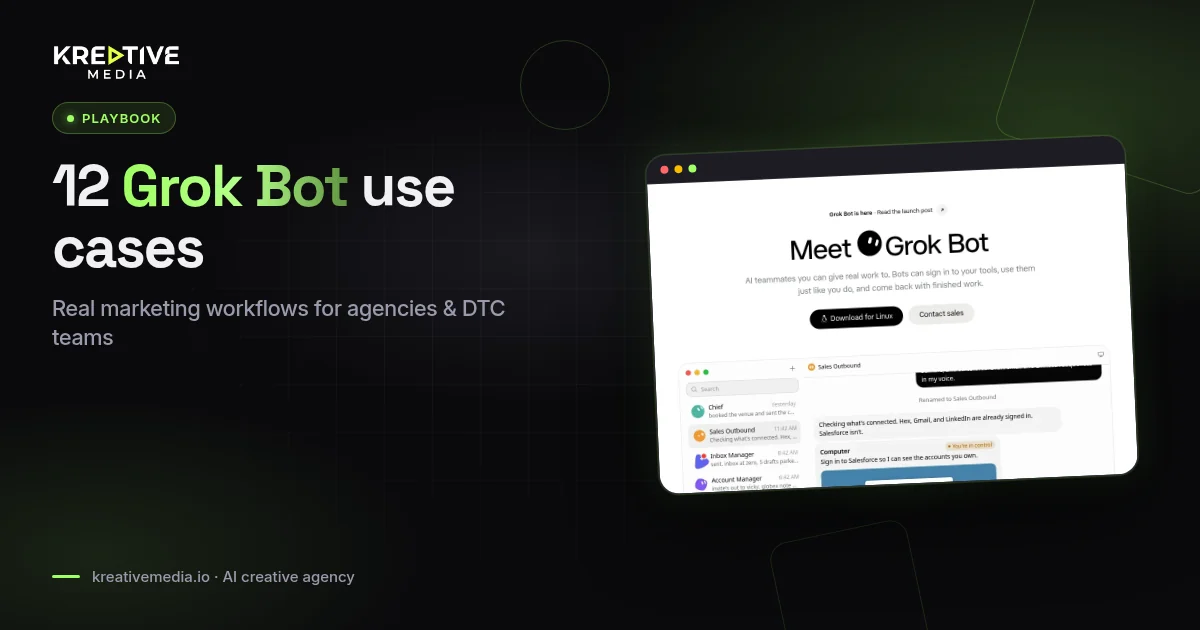
Short answer: the Grok Bot examples worth copying for marketing are the ones that finish work inside real tools: competitor research in Meta Ad Library, creative briefs, official price checks, Gmail triage with drafts left unsent, and scheduled routines that keep running while your laptop is closed. Grok Bot is an AI teammate app where each named Bot works on a persistent cloud computer with a browser, filesystem and terminal. On The X Subscription it starts at the Premium plan, $30 a month, checked on the official pricing page on 4 November 2026.
Below are 12 Grok Bot examples for agencies and DTC teams, one worked walkthrough, setup steps, pricing and the guardrails we’d put in place before letting a Bot near a client account. Nothing here is a test result. We haven’t published client numbers for these workflows, so you won’t find ROAS claims or win rates in this guide.
Quick take
- Best for: agencies and DTC teams that want research and drafting done end to end, then handed back for review.
- Skip it if: you only need short chat copy and never run multi-app or scheduled work.
- Watch out for: every Bot on your account shares one cloud computer, so files, browser sessions and app logins are visible to all of your Bots.
- Safe default: keep sending, publishing and purchasing behind your approval.
What is Grok Bot?
Grok Bot is SpaceXAI’s AI agent service for “AI teammates.” You create a Bot with a name and a job, message it like a colleague, and it does multi-step work across apps and websites. It comes back when the work is done or when something needs your approval. The official Grok Bot overview lists what sets it apart:
- Each Bot works on a persistent cloud computer with a browser, filesystem and terminal. It uses connected apps where they exist and computer use (clicking through a website) for everything else.
- Setup is a message, not a workflow builder. The same Bot is reachable from the desktop app on macOS, Windows and Linux and from the iPhone and Android apps.
- Bots can run in parallel, message each other and share context in group chats.
- A named Bot keeps its memory, files, browser sessions and preferences between sessions.
- A workflow you walk a Bot through can be saved as a skill and rerun on a schedule.

The Verge covered the launch in Grok is now an AI ‘teammate’ you can assign work (12 August 2026). It reported that the Bots share a cloud computer, can sign into the apps and websites you already use, and that SpaceXAI built Grok Bot on an internal prototype it already used for sales outreach, marketing and office operations. At launch the beta was limited to SuperGrok Heavy, Cursor Ultra and Cursor Teams Premium subscribers. Access is wider now (see pricing below).
Cursor is part of the same family. TechCrunch reported in SpaceX officially closes its Cursor acquisition (15 August 2026) that Cursor is now part of SpaceX, which had also acquired xAI earlier in the year. That’s why Grok Bot help pages live on both cursor.com and docs.x.ai, why you sign in with a Cursor account, and why the computers Bots work on run in Cursor’s cloud.
Grok Bot at a glance for marketers
| Marketing job | How Grok Bot does it | What you still own |
|---|---|---|
| Competitor ad research | Computer use in a real browser, plus notes and tables in files | What gets briefed into production |
| Creative briefs | Draft packs from landing pages, product bullets and past ads | Brand voice and claim safety |
| Price and rights checks | Opens official pricing and terms pages | The final publish decision |
| Inbox triage | Gmail app: search, read, label and draft | Hitting send |
| Recurring reports | Skills plus scheduled or event-triggered routines | Anything shared outside the team |
Who these Grok Bot examples are for
Performance marketers, creative strategists, affiliate publishers and small agencies that already ship ads every week. If you run an AI UGC stack, pair the research examples here with our AI UGC ads guide and the Arcads review. Grok Bot does the research and paperwork. The video tools still make the ads.
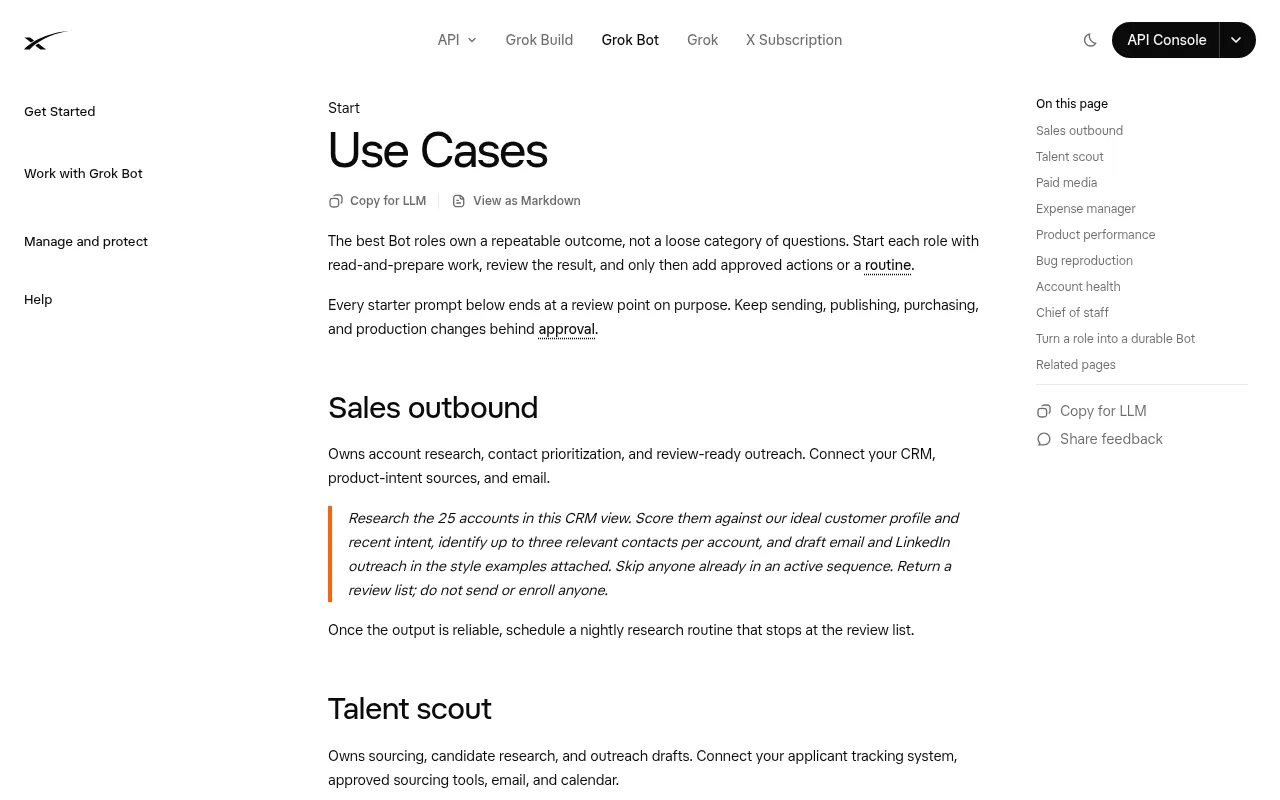
SpaceXAI’s own Grok Bot use cases page includes a paid media role that pulls spend by campaign, compares it with budget and target CAC, recommends reallocations and drafts a Slack update, with a hard rule not to change budgets or send the message. Every starter prompt on that page stops at a review point on purpose. The examples below follow the same pattern.
12 Grok Bot examples for marketing work
1. Competitor sweep in Meta Ad Library
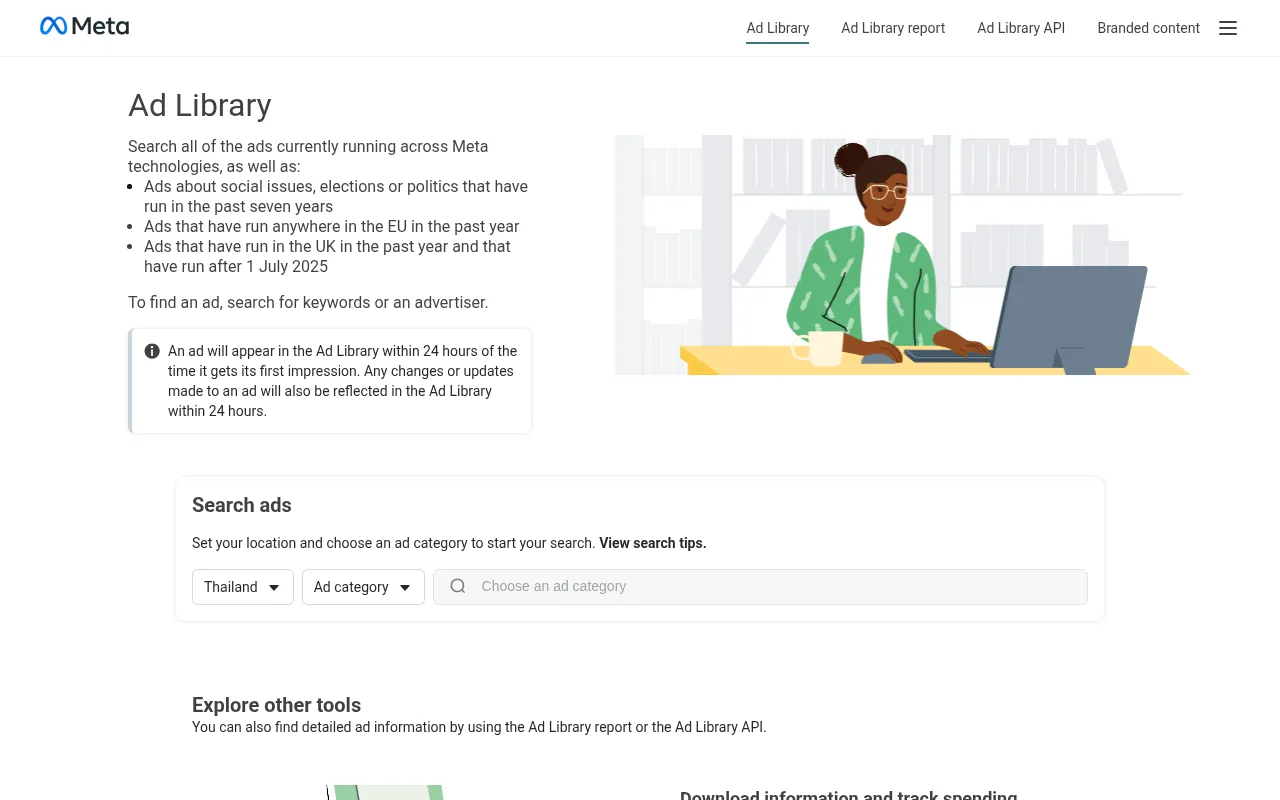
Give Grok Bot a list of competitor brands and target countries. Ask it to open Meta Ad Library, record the hook, format and CTA for each active ad, and write a one-page summary with links. Tell it not to log into any ad account. If Ad Library throws a CAPTCHA, the Bot hands control back to you for that step, which the official docs list as a normal hand-back case.
2. Landing page angle extraction
Point the Bot at a competitor URL. Ask for the main promise, the proof types used, the objections handled and 10 alternate hooks that make no claim you can’t back up. Do this before you spend credits on the video tools covered in how much AI video ads cost.
3. Creative brief pack for UGC
Feed it product bullets, a banned-claims list and three reference ads. Ask for hooks, a beat sheet, on-screen text, a CTA and disclosure notes. Keep the platform rules from our Meta AI disclosure guide in the brief template so the Bot checks against them every time.
4. Official price and rights checker
Send the Bot to vendor pricing and terms pages. Ask it to quote plan names and public dollar prices only, drop any figure that appears only behind a login, and stamp the date it checked. That habit keeps comparisons like HeyGen vs Arcads accurate when vendors change their plans.
5. Screenshot folder hygiene
Ask it to rename and sort official screenshots, draft alt text and flag anything that looks unofficial. You still decide what goes live.
6. Gmail sponsor and partner triage
With the Gmail app connected, the Bot can search, read, label and draft mail on that mailbox. Ask for a list of unanswered partner threads and a draft reply for each one in your voice, left unsent.
7. Slack creative request intake
A routine can start from a Slack message. Set a narrow match, for example a message in your requests channel that contains a product URL and the phrase “new brief”, and have the Bot open a structured checklist. The official docs warn against broad listeners like “every new message” because they create noise and burn usage.
8. Weekly AI creative news digest
Schedule a Monday routine that scans a fixed list of official blogs and changelogs and posts a digest in the Bot’s conversation. Tell it to report a failure if a source is down instead of reusing last week’s notes.
9. Article outline from SERP notes
Have the Bot open the top ranking pages for a keyword, note their H2 patterns and gaps, and draft an answer-first outline with FAQ questions. You write the article.
10. Multilingual hook variants
From one approved English hook, ask for variants in your target languages, each flagged for native review before any paid spend.
11. Post-publish live check
After an article goes live, ask the Bot to confirm the title and H1 on the live URL, list broken internal links and prepare a Search Console inspection checklist for you.
12. Hand an X post to your Bot
Tag @bot on X in a reply, for example “@bot summarize this thread and send the key points to my Slack.” Your main Bot picks up the post on its cloud computer, and @bot posts only a short confirmation on X. It’s a quick way to turn a competitor’s launch thread into a research task. Tagged requests use your Grok Bot usage.
Example walkthrough: from Ad Library to a UGC brief
- Create a Bot named Ad Research. Browser access is enough for Ad Library, so don’t connect anything else yet.
- In the first message, paste five competitor brands and your target countries, and ask the Bot to remember its job and boundaries.
- Ask for a table with brand, ad link, hook, format and CTA.
- Ask for patterns only. Ban “winning ads” language unless you have measured results.
- Feed the patterns into a UGC brief with eight hooks and a disclosure checklist.
- Send the brief to your editor. Production can move to the tools in Creatify vs Arcads or Kling vs Seedance.
Keep the first run small: five brands, one country. If a CAPTCHA or a login wall appears, you finish that step yourself. That hand-back is how the product is designed, and it matches what The Verge described at launch: Bots come back when something needs approval.
Setup steps for your first marketing Bot
- Install the desktop app (macOS, Windows or Linux) or the iPhone or Android app, then sign in with your Cursor account. Grok Bot creates your first Bot, named Grok Bot, automatically.
- Create a separate Bot for each distinct job and give it one primary role in its first message.
- Connect only the apps that job needs. Connected apps are account-wide, so every Bot you run can use them.
- Hand it one bounded task with a clear finish line and an approval boundary for sends.
- Correct the output, then ask the Bot to save the process as a skill.
- Add a routine only after the skill has run cleanly on a second input.
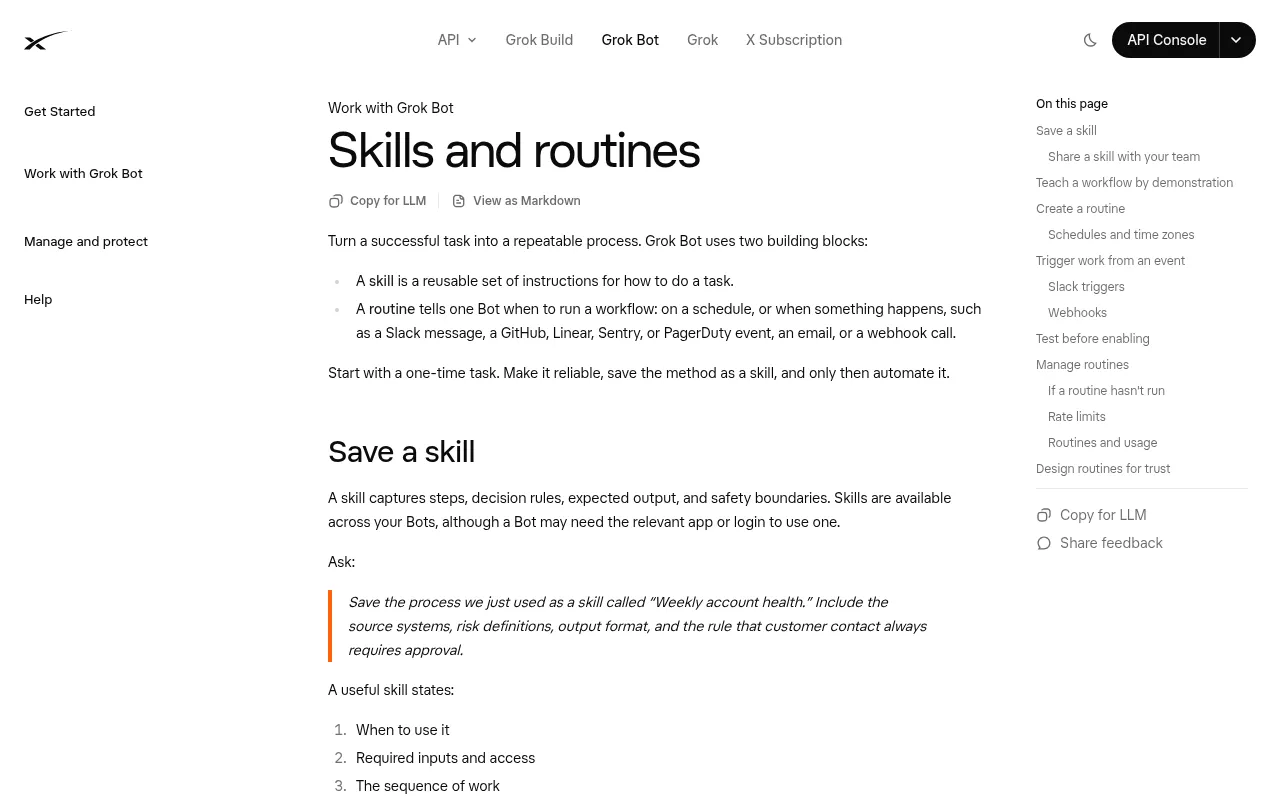
The official skills and routines guide spells out the order: start with a one-time task, make it reliable, save it as a skill, and only then automate it. Routines can run on a schedule or start from a Slack message, a GitHub, Linear, Sentry or PagerDuty event, an email or a webhook call, and they run in the cloud while your laptop is closed. Where Teach a task is available, you can also demonstrate a browser workflow once (recordings run up to ten minutes) and review the draft skill the Bot creates.
How much does Grok Bot cost?
On The X Subscription, Grok Bot is included on Premium, Super and Ultra. Plus and Free don’t include it. Grok Bot doesn’t have its own meter: usage draws from the same weekly pool you use for Grok and Cursor, and the pool refreshes every week. When it runs out, you can buy top-up credits or wait for the refresh.
| The X Subscription plan | Monthly | Annual | Usage vs Plus | Grok Bot |
|---|---|---|---|---|
| Free | $0 | $0 | Limited | Not included |
| Plus | $8 | $80 | Base | Not included |
| Premium | $30 | $300 | 4x | Included |
| Super | $100 | $1,000 | 15x | Included |
| Ultra | $200 | $2,000 | 50x | Included |
Teams start at $30 per user per month, and Enterprise is custom priced. If you’re still on a legacy Cursor plan, Grok Bot is included on every paid individual plan (Pro, Pro+ and Ultra) and on Cursor Teams. You can also link an individual SuperGrok, SuperGrok Plus, SuperGrok Heavy or X Premium+ subscription. The full matrix is on the Grok Bot plans and billing help page.
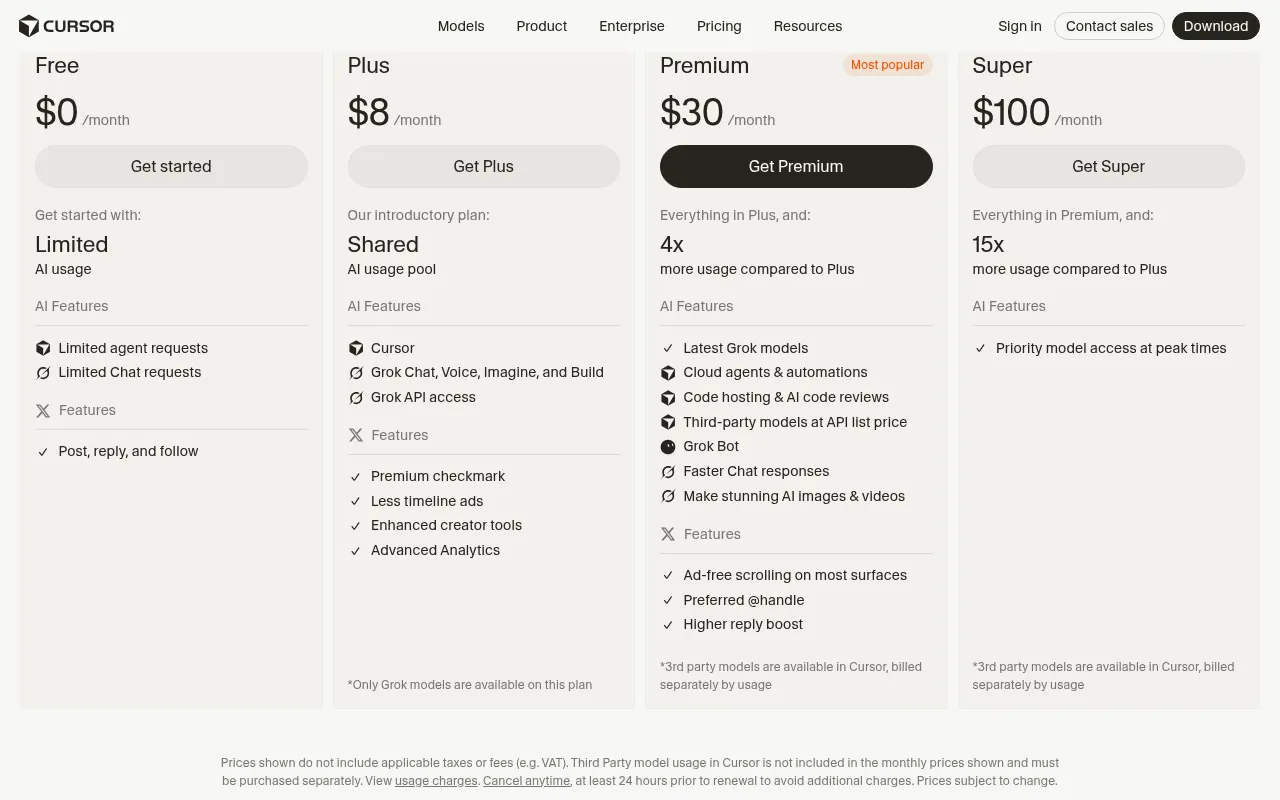
Sources: cursor.com/pricing, x.ai/pricing and The X Subscription pricing docs, checked 4 November 2026. US list prices exclude tax, and third-party models in Cursor are billed separately.
Guardrails before a Bot touches client work
- Separate read-only research Bots from any Bot that can publish or send.
- Don’t paste passwords into chat. Use a connected app (OAuth tokens stay on Cursor’s connector backend) or the secure take-over flow for sign-ins.
- Date every price and policy quote the Bot collects.
- Remember that all your Bots share one computer, including its files, browser sessions and app logins.
- Tell routines to report a failure instead of reusing stale data.
- Think twice before logging into client ad accounts from the shared computer unless your security policy allows it.
What Grok Bot does well and where it falls short
Grok Bot is good at multi-step research in a real browser, it keeps context on a named Bot, and its routines keep running while you’re offline. The limits are real too. Some sites stop automation with CAPTCHAs or login walls, and a person has to finish those steps. Long browsing sessions draw from the same weekly pool as everything else on your plan. And a Bot can’t judge whether a claim is safe or whether a hook fits your brand. Use it for research and drafts, then make the ads in production tools such as the ones in our Higgsfield review, and budget with AI UGC vs real creators cost.
How agencies should brief a Grok Bot without wasting the weekly pool
Teams waste usage when they treat Grok Bot like an unlimited intern. Start every task with a finish line, a file format and a stop condition. A good brief names the five brands to check, the countries that matter, the fields that belong in the table and what to do when Ad Library shows a CAPTCHA. A weak brief says “research competitors and make it useful,” and you get a long wander that eats the pool and still needs a rewrite.
Keep a short library of task cards in shared notes. Each card lists the inputs, outputs, tools allowed, tools forbidden and the approval boundary. When a new hire joins, they run the same card instead of inventing a new prompt style. Better still, save each card as a skill. Private skills are shared across all your Bots, and on a team you can publish a skill so teammates can use it.
Measure usefulness with time to first usable pack and how much a human edits, not adjectives. If the edits stay heavy after three cycles, narrow the task. Never put a routine on top of a broken skill.
Fitting Grok Bot into a UGC production week
One simple split: Monday for research packs, Tuesday for briefs, Wednesday for production in your video stack, Thursday for QA and Friday for notes on what worked. Grok Bot earns its keep on Monday and Tuesday. Wednesday stays human-led inside the video tools. That split stops anyone expecting one agent to own the whole funnel.
How to measure the week without vanity KPIs
Track three numbers an editor can collect without a BI tool. Cycle time from brief request to approved research pack. Edit rate, meaning how many sentences a person rewrites before publishing or shooting. Rejection rate, meaning packs thrown away because the angles were useless. Log them in a shared sheet every Friday. After four weeks you’ll know whether the Bot is saving hours or just moving the same work into review meetings.
Don’t tie ROAS to a research agent in the first month. Media results depend on the offer, creative, audience, season and landing page. When leadership wants a money metric, convert hours saved into the loaded hourly cost of the people who used to do the work. It’s still an estimate, but it’s closer to the truth than a made-up conversion chart.
Log failures in the same sheet: CAPTCHA stops, rate limits, empty searches and wrong prices. Teams that hide failures over-automate the next sprint. Teams that write them down end up with better stop rules.
FAQs
What are the best Grok Bot examples for a small agency?
Start with Meta Ad Library sweeps, landing page angle extraction, UGC brief packs and Gmail triage with drafts left unsent. Automate a workflow with a routine only after the manual version works twice.
Does Grok Bot keep working when my laptop is closed?
Yes. The official Grok Bot FAQ says Bot work runs on the cloud computer, so closing the app, laptop or phone doesn’t stop a background turn or a routine.
Can several Grok Bots work at the same time?
Yes. Bots can work in parallel and message each other. Each Bot gets its own screen on the shared computer, and one Bot runs one computer-use task on its screen at a time.
Is Grok Bot included in the X Subscription Plus plan?
No. Grok Bot starts at Premium ($30 a month). Plus ($8) and Free don’t include it. Super and Ultra add larger weekly usage pools.
Should Grok Bot send emails or publish posts on its own?
Not at first. SpaceXAI’s own use case prompts keep sending, publishing, purchasing and production changes behind approval. Hold to that until a skill has a clean track record.
How is Grok Bot different from a chatbot?
A chatbot returns text. Grok Bot acts in connected apps and a real browser on its own cloud computer, remembers its job, and can rerun saved skills as routines.
Where should I check Grok Bot prices?
Check cursor.com/pricing or x.ai/pricing and the Grok Bot plans and billing help page on the day you buy. Plans changed after launch, so older articles may be out of date.
Get help from Kreativemedia
Want the research done and the AI UGC ads made for you? Kreativemedia produces AI UGC hooks for your product. Get in touch through blog.kreativemedia.io, or compare tools first in our Arcads alternatives list.

Jitendra Vaswani is an SEO expert, AI and marketing professional, and the founder behind Kreativemedia. He started BloggersIdeas in 2013, runs AffiliateBooster and SchemaNinja, and through DigiExe has worked with 1,400+ clients across 28 countries. He is the international bestselling author of Inside A Hustler’s Brain (20,000+ copies) and has spoken at Affiliate Summit, Affiliate World, DMSS and TES. Find him at jitendra.co.