
Midjourney product photography prompts work best on V8.2, the default model since 24 July 2026, when you pair a descriptive scene with the Edit Model so Midjourney starts from your real product photo instead of inventing a pack. Attach up to four reference images, tell the model what to preserve, then describe the surface, light and camera. Below are 10 copy-paste templates for common product shots, the Edit Model steps, plan prices checked on 18 November 2026 and the commercial-use rule that decides whether you need Pro or Mega.
These are templates, not a gallery of our outputs. We wrote each one from Midjourney’s own Edit Model and version documentation, and we have not run a scored test bench on them, so you will not find invented success rates here. Midjourney can still get label text and logos wrong, so check every output before it goes near an ad. If your company grosses more than $1,000,000 a year, you need a Pro or Mega plan to use the images commercially.
Midjourney product photography prompts: the quick answer
| Question | Short answer |
|---|---|
| Which model should I use? | V8.2, the default since 24 July 2026 |
| How do I use my real product photo? | Edit Model: attach up to four images on the web, or add –edit and image URLs on Discord |
| What replaced Omni Reference? | On V8.1 and V8.2, the Edit Model. Omni Reference (–oref) is V7 only |
| Which plan do I need? | Any paid plan for small businesses; Pro or Mega if your company grosses over $1,000,000 a year |
| What is the weak spot? | Small label text and logos, so check every output |
Which Midjourney version should you use for product photos?
Use V8.2. Midjourney’s version page says V8.2 became the default model on 24 July 2026 and focuses on aesthetics, image quality and Personalization. It also introduces the Edit Model, which replaces Omni Reference, Character Reference and the Retexture tool. V8.1 was the default from 10 June to 23 July 2026, and V7 held the default from 17 June 2025 to 9 June 2026.
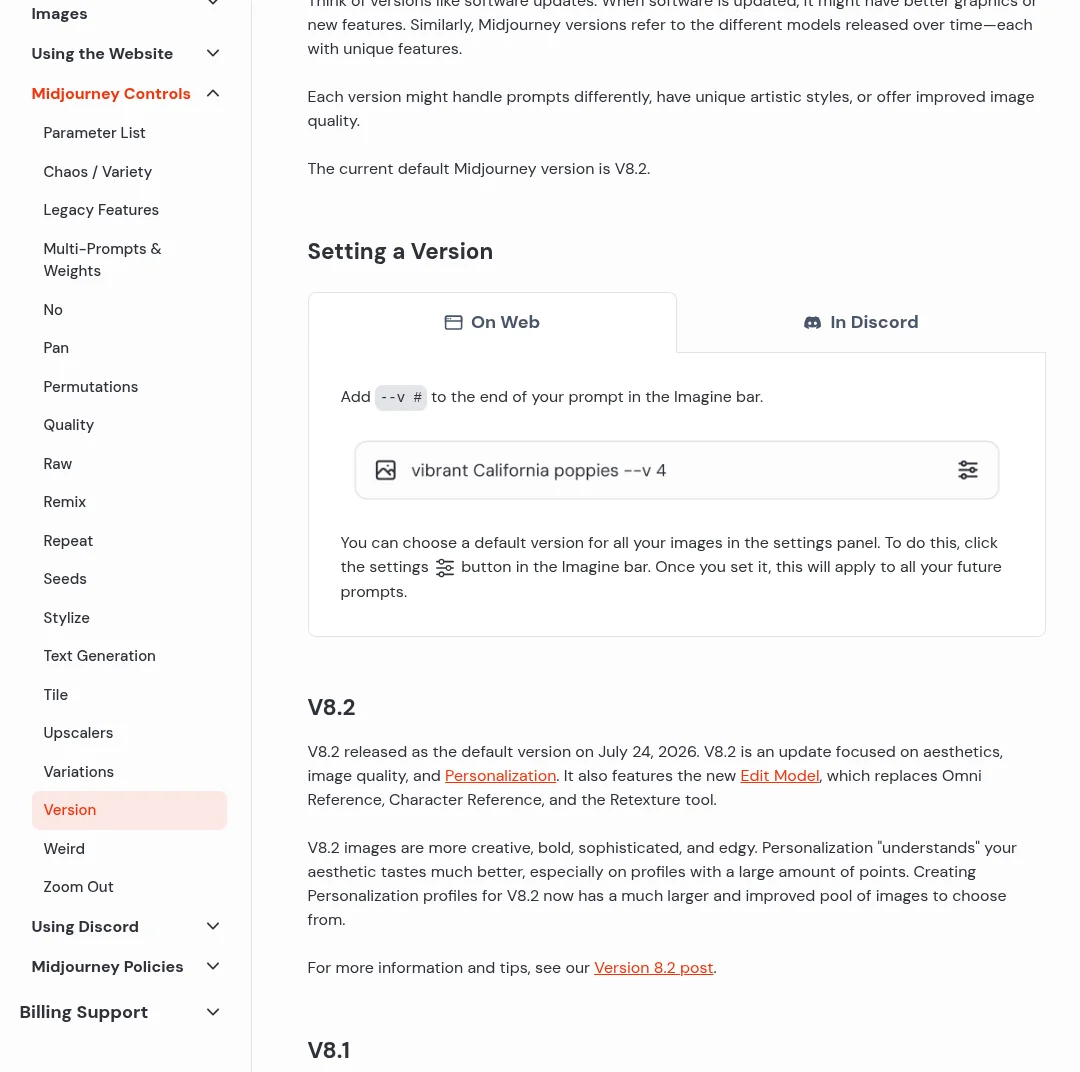
Two V8.2 details matter for product work. First, HD images come out at 2K without upscaling, and HD costs 1.3 minutes of GPU time against 0.8 minutes for SD. You switch with –hd or –sd. Second, inpainting and outpainting on an HD image downscale it to SD, so decide on HD before you start editing. The maximum aspect ratio is 14:1, or 4:1 for HD.
Can Midjourney use my real product image?
Yes, through the Edit Model on V8.1 and V8.2. Midjourney’s docs list three uses: change an existing image with written instructions, generate new images from up to four reference images, and run inpainting or outpainting in the Editor. For product photography the second use is the one you want. Your packshot goes in as a reference, and the prompt describes the new scene around it.
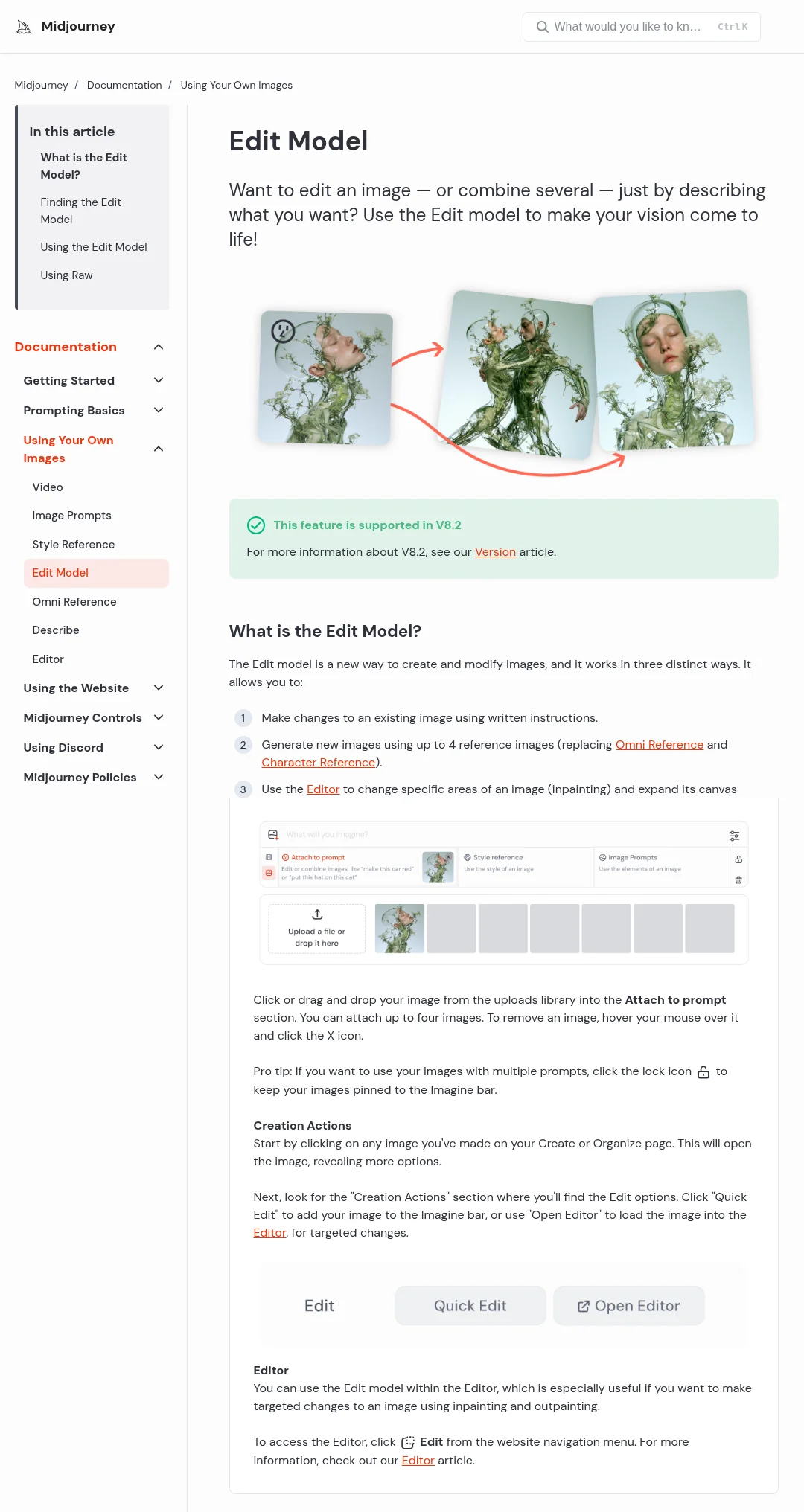
How to use the Edit Model on the web
- Open the Imagine bar and click the image icon.
- Drag your product photos into “Attach to prompt”. You can add up to four.
- Click the lock icon if you want the same images pinned across several prompts.
- Type your scene prompt, set –ar if you need a specific shape, and generate.
How to use the Edit Model on Discord
Add –edit at the end of your prompt, then paste the image URL or URLs, separated by spaces. If you do not set –ar, the result automatically matches the aspect ratio of the first image you uploaded. Your default aspect ratio settings do not apply in Edit mode.
Edit Model rules worth knowing
- Instructions work. The Edit Model accepts instructional prompts, like Conversational mode, as well as descriptive scene prompts. “Keep the bottle exactly as it is and place it on wet black stone” is a valid prompt.
- Use –raw when the prompt must win. It reduces Midjourney’s default creative flair, so your wording has more influence.
- It combines with other tools. Image Prompts, Style References, Moodboards, Personalization and –hd all work with the Edit Model.
- Two limits. It is not compatible with –tile, and results cannot currently be used with Remix.
- Omni Reference is a V7 tool. Midjourney’s docs say to use the Edit Model when you are on V8.x, so we do not build any template here on –oref.
What is the best prompt formula for product shots?
The best formula has three layers: an instruction that protects the product, a scene description in concrete visual words, and the parameters. Here is the skeleton every template below follows:
Keep the (product) from the attached image exactly as it is: shape, colour, cap and label text.
Place it (where) on (surface), (light direction and quality), (camera angle and lens feel), (background), (mood), realistic commercial product photography.

--ar (ratio) --v 8.2 --raw
Describe what the camera should see, not how the ad should feel. “Premium look” gives Midjourney nothing to work with. “Soft window light from the left, a thin reflection on the glass, shallow depth of field” does. Keep the first line short and firm, and spend your words on the scene.
Image Prompts are a different tool and are worth keeping separate in your head. They use a picture as inspiration for content, composition and colour, not as an exact copy, and the image weight (–iw) defaults to 1 with a range of 0 to 3 on V8.1 and V7. For a real pack that must stay recognisable, use the Edit Model. For a mood or colour reference, use an Image Prompt or a Style Reference.
10 copy-paste Midjourney prompts for product photography
Attach your own product photo (sharp, straight-on, evenly lit) before running each one. Swap the words in brackets for your product. Start at the default size, keep what works, then rerun the keeper with –hd.
Template 1: White background packshot
The marketplace staple: a clean product on white, ready for a listing or a catalogue.
Keep the (product) from the attached image exactly as it is: shape, colour, cap and label text. Place it centred on a pure white background with a soft, even shadow underneath, front view, softbox lighting, sharp focus edge to edge, high-resolution e-commerce packshot, no props.

--ar 1:1 --v 8.2 --raw --hd
What to watch for: Edges and shadow direction. Keep the prompt short, because extra scene words pull the white background toward grey. Check that the label is still readable at full size.
Template 2: Skincare on wet stone
A spa-style hero for serums, creams and bottles.
Keep the (skincare bottle) from the attached image exactly as it is, including the pump and label text. Place it on a wet dark slate surface with a few water droplets, soft morning light from the left, a pale green leaf blurred in the background, shallow depth of field, calm premium skincare photography.

--ar 4:5 --v 8.2 --raw
What to watch for: Droplets landing on the label. If water hides the text, add “the label stays dry and fully visible” to the prompt.
Template 3: Cosmetics flat lay
An overhead arrangement for lipsticks, palettes and brushes.
Overhead flat lay. Keep the (lipstick) from the attached image exactly as it is. Arrange it on a soft pink textured paper background with a loose swatch of the same shade, a small gold mirror and two dried flowers, soft diffused daylight, gentle shadows, editorial beauty photography.

--ar 4:5 --v 8.2 --raw
What to watch for: Colour accuracy. Midjourney tends to shift product colour toward the scene palette, so compare the shade with your original photo.
Template 4: Jewelry macro on velvet
Close detail shots for rings, earrings and pendants.
Macro close-up. Keep the (ring) from the attached image exactly as it is, including the stone shape and metal tone. Rest it on deep emerald velvet, a single soft highlight along the band, sparkle on the stone, very shallow depth of field, luxury jewelry photography.

--ar 4:5 --v 8.2 --raw --hd
What to watch for: Stone cut, prong count and engraving. Fine detail is where generated images drift, so check it against the original.
Template 5: Beverage can with splash
Energy, motion and cold drinks.
Keep the (beverage can) from the attached image exactly as it is, including the logo and label text. Place it upright on a wet reflective surface, cold condensation on the metal, a dynamic water splash frozen mid-air around it, backlight from behind, deep blue gradient background, high-speed advertising photography.

--ar 4:5 --v 8.2 --raw
What to watch for: Splash covering the logo and a warped can silhouette. Ask for “splash behind and beside the can, never in front of the label”.
Template 6: Supplement lifestyle in a kitchen
A real-life scene for tubs, jars and pouches.
Keep the (supplement jar) from the attached image exactly as it is, including the label text. Place it on a light oak kitchen counter next to a glass of water and a bowl of fresh berries, morning sunlight through a window on the left, soft background blur, warm natural lifestyle photography.

--ar 4:5 --v 8.2 --raw
What to watch for: Health claims. Keep the scene free of visuals that imply medical outcomes, because ad platforms review supplement creative closely.
Template 7: Sneaker floating with shadows
A dynamic hero for footwear launches.
Keep the (sneaker) from the attached image exactly as it is: laces, sole pattern and logo. Float it at a slight angle above a pastel peach studio floor, a soft contact shadow below, a few coloured paper shapes drifting around it, bright even studio light, playful modern sneaker campaign photography.

--ar 4:5 --v 8.2 --raw
What to watch for: Sole shape and the number of eyelets. Floating angles are where proportions slip, so compare against your original.
Template 8: Candle in a cozy interior
Seasonal home scenes for candles and decor.
Keep the (candle) from the attached image exactly as it is, including the vessel and label. Place it on a wooden side table beside a folded knit blanket and an open book, the flame lit with a warm glow, dusk light through a window, soft bokeh in the background, cozy home lifestyle photography.

--ar 4:5 --v 8.2 --raw
What to watch for: Flame glow washing out the label. Lower the warmth in the prompt if the text fades.
Template 9: Tech gadget on a desk
Earbuds, chargers, speakers and other small devices.
Keep the (wireless earbuds and case) from the attached image exactly as it is. Place them on a clean walnut desk beside a closed laptop and a ceramic mug, cool morning light, subtle screen glow in the background, shallow depth of field, modern tech product photography.

--ar 16:9 --v 8.2 --raw
What to watch for: Buttons, ports and logos. Small hardware details often get simplified, so look at every connector.
Template 10: Holiday gift scene
A seasonal set for gift guides and campaign banners.
Keep the (gift box) from the attached image exactly as it is, including the ribbon and printed logo. Place it under a softly lit pine tree with warm fairy lights glowing in the background, a few wrapped gifts around it, light snow-toned tablecloth, festive holiday advertising photography.

--ar 4:5 --v 8.2 --raw
What to watch for: Ribbon colour and logo placement. Busy scenes steal attention from the product, so keep props to three or fewer.
Which Midjourney plan do businesses need?
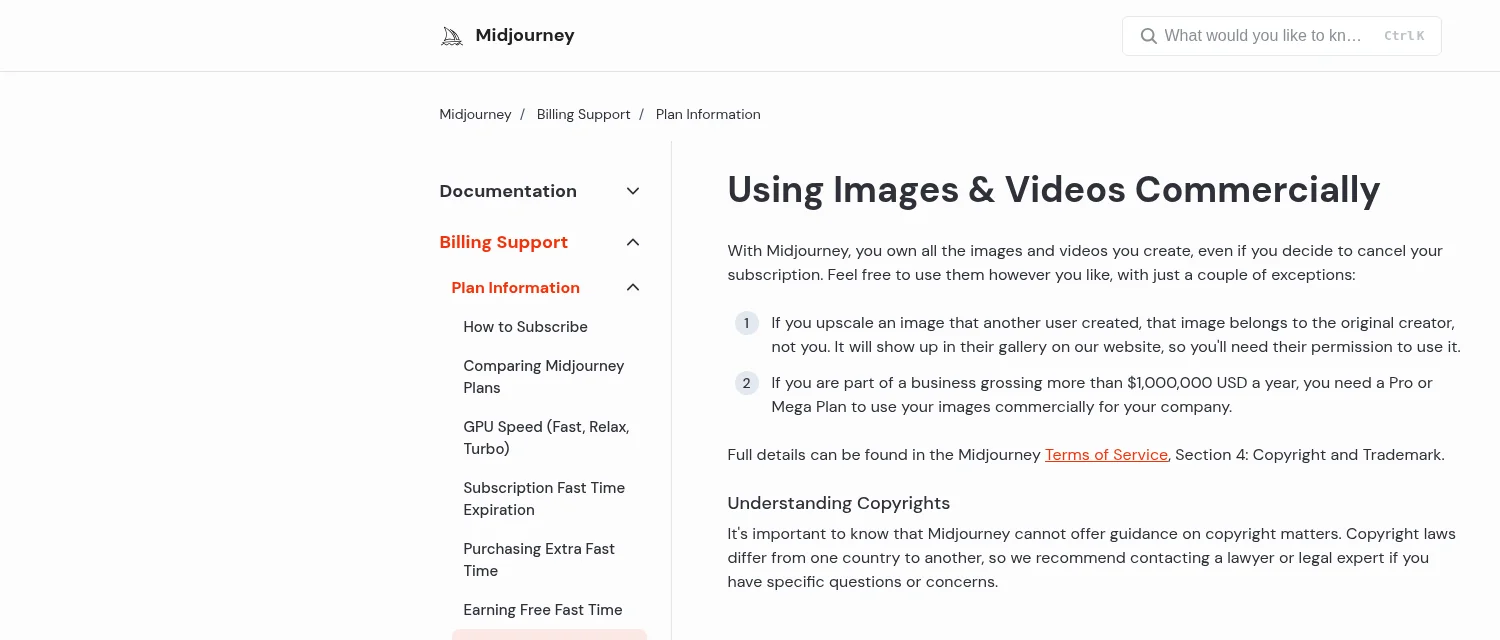
Any paid plan lets you create images, but the commercial-use rule depends on company size. Midjourney’s docs say you own the images and videos you create, even after canceling, with two exceptions: if you upscale another user’s image, it still belongs to the original creator, and if you are part of a business grossing more than $1,000,000 USD a year, you need a Pro or Mega plan to use your images commercially for the company. Midjourney does not give copyright legal advice.
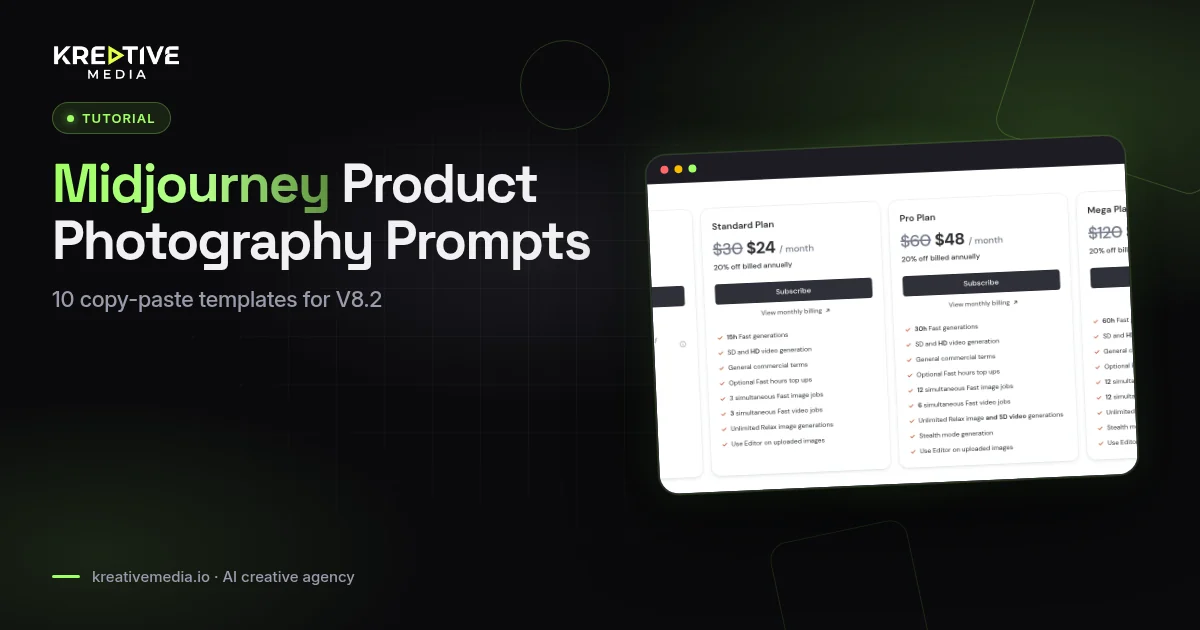
Prices below were checked on Midjourney’s pricing page on 18 November 2026, with the yearly billing toggle on.
| Plan | Monthly price | Per month, billed yearly | What stands out |
|---|---|---|---|
| Basic | $10 | $8 | Limited generations, no Relax mode |
| Standard | $30 | $24 | 15h Fast, unlimited Relax image generations |
| Pro | $60 | $48 | 30h Fast, 12 simultaneous Fast image jobs, Stealth mode |
| Mega | $120 | $96 | 60h Fast, 12 simultaneous Fast image jobs, Stealth mode |
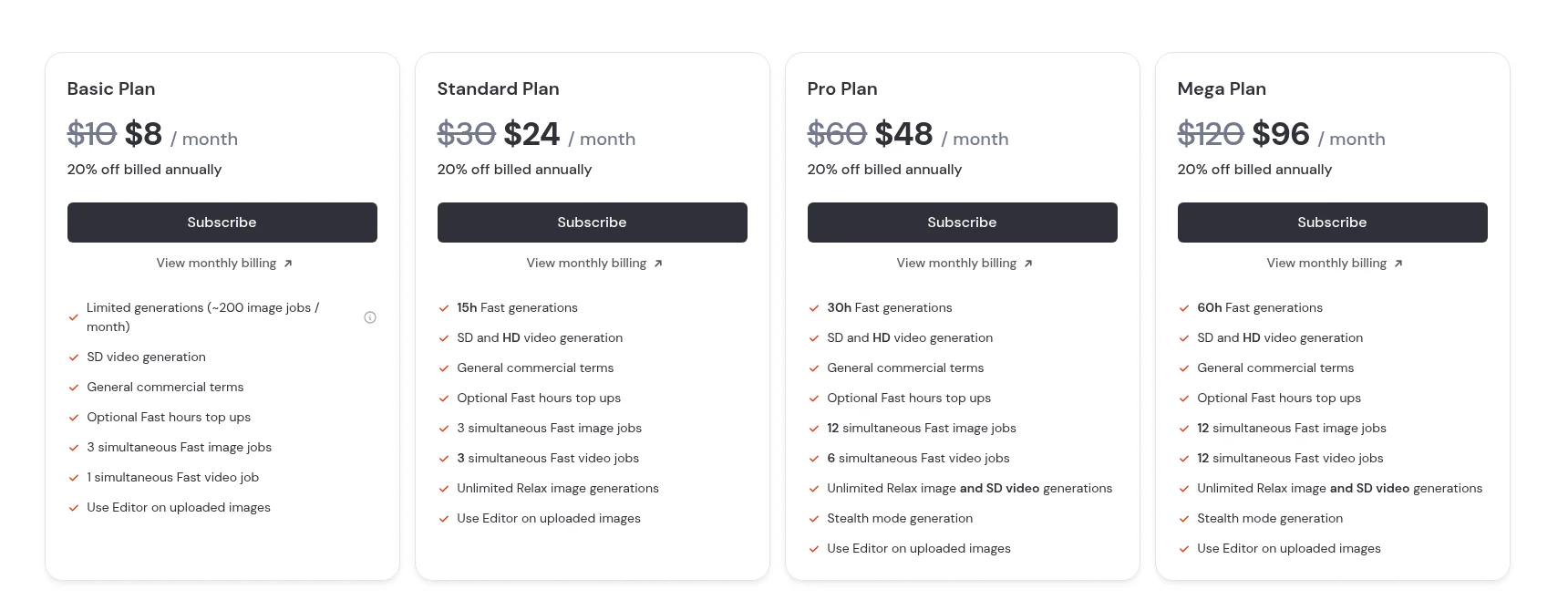
Every plan includes general commercial terms and the Editor on uploaded images. For a solo store owner or a small brand, Standard is the practical starting point because unlimited Relax image generations take the pressure off iteration. For a company over the $1,000,000 revenue line, Pro or Mega is the plan Midjourney’s terms require. Stealth mode on Pro and Mega also keeps your generations out of public view, which matters when a launch is unreleased.
What does iterating cost?
Fast hours reset on renewal, and unused Fast time does not carry over. An image prompt usually uses about one minute of GPU time, and upscaling can take more. HD costs 1.3 minutes against 0.8 for SD, so test the scene at SD and render only the keeper in HD. Relax wait times are typically 0 to 10 minutes on plans that include it.
Where does Midjourney fall short on product shots?
Midjourney is at its best on mood, light and surface, and at its weakest on small printed detail. Midjourney’s own V7 documentation warns that “intricate details like specific freckles or logos on clothing may not perfectly match your reference.” That caveat is about the older Omni Reference tool, and we have not measured how V8.2 compares, so the safe habit is to check logos, ingredient lists and barcodes on every output.
- Retouch text. If a label comes back slightly off, fix it in an editor or composite the real label back on.
- Use the Editor for small fixes. Inpainting a single area is faster than rerunning the whole scene, remembering that HD images downscale to SD when inpainted.
- Keep claims out of the scene. Visuals that imply health or cosmetic outcomes can fail ad review.
- Treat the output as a concept or a background. For strict catalogue accuracy, a real photograph with an AI-generated background is the lower-risk route.
Common mistakes with Midjourney product prompts
- Uploading a weak photo. A blurry or angled reference gives the Edit Model less to preserve. Use a sharp, straight-on shot.
- Stacking too many styles. One light direction and one mood per prompt. Mixed instructions produce muddy results.
- Forgetting –ar. In Edit mode the result matches your first upload, not your default setting.
- Going HD too early. HD costs more GPU time and downscales on inpainting. Settle the scene first.
- Using V7 advice on V8.2. Older guides build everything on –oref. That workflow now belongs to V7.
If you also need motion, Midjourney’s video generator launched in 2025, and The Verge covered the launch. Our templates here are for stills. For product video prompts, see our guide to Kling prompts for product videos.
How did Midjourney get here?
Midjourney moved from a single model to a fast release cycle. TechCrunch reported the V7 release in April 2025 as the company’s first new image model in nearly a year. V8.1 and V8.2 followed in 2026, and V8.2 brought the Edit Model that this guide is built on. Features and defaults change quickly, so treat the dates in this article as a snapshot from 18 November 2026.
Related guides
If you are planning wider creative work, start with our guide to AI video ads. For the pricing side of AI video, read our Kling review. If your products are clothing, compare tools in best AI fashion model generators and FASHN vs Modelia, and read whether AI models are legal for clothing brands.
How we put this guide together
We built every template on Midjourney’s Edit Model, version and commercial-use documentation, and checked the plan prices against Midjourney’s pricing page on 18 November 2026. Screenshots were captured the same day from Midjourney’s official pages. The prompts are starting points written for common product briefs; we do not publish output scores we have not measured. Read more in our editorial policy and how we research pages.
FAQs
Is Midjourney good for product photography?
Yes for mood, lighting and lifestyle scenes, with a caution on small text. V8.2 and the Edit Model let you start from your real product photo, but label text and logos can drift, so check every output before using it in an ad.
Can Midjourney use my own product image?
Yes. On V8.1 and V8.2, attach up to four images with the Edit Model on the web, or add –edit and image URLs on Discord. Omni Reference (–oref) is a V7-only tool.
Which Midjourney version is best for product photos?
V8.2, the default since 24 July 2026. It focuses on aesthetics, image quality and Personalization, and it includes the Edit Model. V8.1 also supports the Edit Model.
Can I sell images made with Midjourney?
Yes. Midjourney says you own the images you create, even after canceling, except when you upscale another user’s image. Companies grossing over $1,000,000 a year need a Pro or Mega plan to use images commercially.
Which Midjourney plan should a business choose?
Small businesses can start on Standard ($30 a month, or $24 billed yearly) for unlimited Relax image generations. Companies over $1,000,000 in annual revenue need Pro ($60 a month, or $48 yearly) or Mega ($120 a month, or $96 yearly).
What aspect ratio should I use for product images?
Use 4:5 for social and ad feeds, 1:1 for marketplace listings and 16:9 for banners. In Edit mode the result matches your first uploaded image unless you set –ar yourself.
Should I use HD for product shots?
Use HD for the final image, not for every draft. HD gives 2K output without upscaling but costs 1.3 minutes of GPU time against 0.8 for SD, and inpainting an HD image downscales it to SD.
How do I keep the product label readable in Midjourney?
Start from a sharp, straight-on photo, tell the Edit Model to preserve the label text, keep props away from the front of the pack and use –raw so your instructions carry more weight. Then check the result against the original and retouch text if needed.
Do these prompts work with the older V7 model?
The scene wording carries over, but the product-preservation step does not. V7 uses Omni Reference (–oref), while V8.1 and V8.2 use the Edit Model. Midjourney’s docs tell V8.x users to use the Edit Model instead.
Get help from Kreativemedia
Would you rather have product visuals made for you than write prompts yourself? Contact Kreativemedia and tell us about your product and channels. We will tell you whether Midjourney, another generator or a real shoot fits your budget.